 thelocalbuild
Decision guide
When to buy an AI cluster, and what to actually expect
A plain-language guide for the person signing the cheque: what tokens per second really means, how your hardware compares to Claude and ChatGPT, and the GPU-versus-power-versus-throughput matrix nobody publishes.
Every AI hardware conversation eventually reaches the same awkward moment. Someone asks "so will it be as good as ChatGPT?" and the room goes quiet, because the honest answer is a paragraph, not a word.
This guide gives you that paragraph, and then the numbers behind it. It is written for executives who have to make a capital decision, not for engineers who already know what a token is. Nothing here requires a technical background. Everything here is measured or explicitly labelled as modelled.
The short version
If you take nothing else: the speed you need depends entirely on who, or what, is reading the output. A human reading a chat window needs a fraction of what an autonomous coding agent needs, and a nightly batch job needs neither. Buying the wrong tier for your actual workload is the single most common and most expensive mistake in this category.
Part 1. What "tokens per second" actually means
Models do not read words. They read tokens: chunks of text roughly ¾ of a word long. Here is this sentence as the machine sees it:
Our data cannot leave the building.
Seven short words become eight tokens, because "building" splits in two. That is the only mechanic worth knowing.
Number one: how fast it types
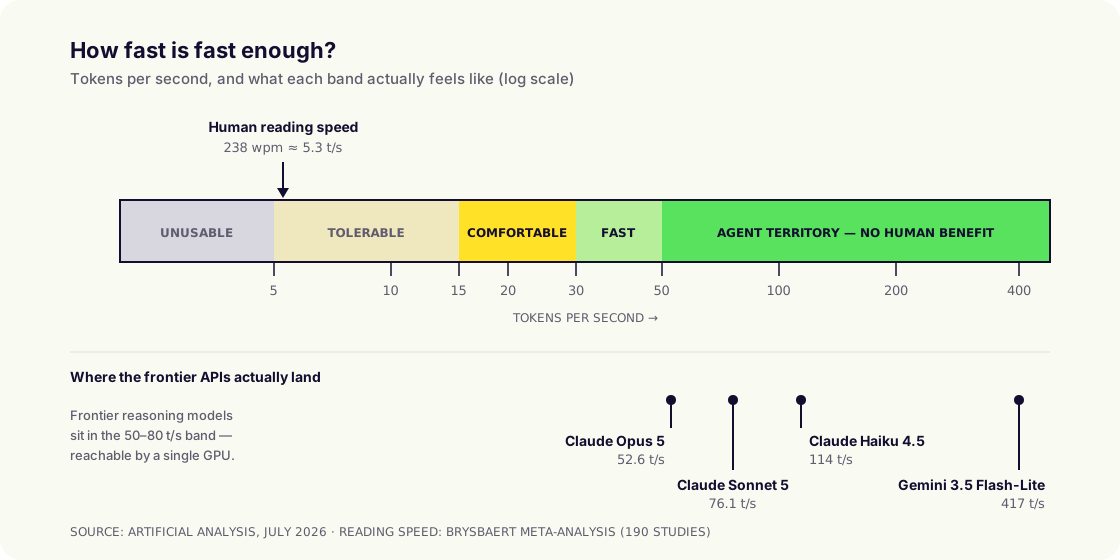
Start with the human. A meta-analysis of 190 studies covering more than 18,000 people puts average adult silent reading at 238 words per minute. Convert that and you get your floor:
238 words/min ÷ 0.75 words per token ÷ 60 = ≈ 5.3 tokens per second, the speed of a person reading carefully.
A model generating at exactly 5 t/s keeps pace with a careful reader, which sounds fine and is actually awful: the reader never gets ahead, never skims, and feels the machine dragging. Here is the practical scale:
| Speed | How it feels to a person | Verdict |
|---|---|---|
| < 5 t/s | Slower than you read. You sit and wait for the sentence to finish. | Unusable for chat |
| 5–10 t/s | Keeps pace with careful reading, but you can never skim ahead. | Tolerable, not pleasant |
| 15–20 t/s | Text arrives slightly faster than you read. Feels responsive. | The practical minimum |
| 30–40 t/s | Text clearly outruns you. Indistinguishable from "instant". | Comfortably good |
| 50+ t/s | No human benefit whatsoever, but machines notice. | Only matters for agents |
Number two: how long before it starts
The second measurement matters more than most buyers realise, and it is the one that actually ruins user experience: time to first token: the silence between pressing enter and the first word appearing.
Humans tolerate slow typing far better than a frozen screen. A response at 15 t/s that starts in half a second feels faster than one at 60 t/s that starts after eight seconds of nothing.
It is driven by how much context the model must read before answering. Short question, short wait. Fifty-page contract attached, long wait. Which is why "how fast is it?" is never one question.
Part 2. So is it fair to compare with Claude and ChatGPT?
Partly. It depends which of three separate questions you are asking, and conflating them is where most evaluations go wrong.

On raw capability: no, and be honest about it
Frontier closed models still lead on the hardest reasoning and agentic benchmarks. Claude Opus 5 scores 61 on the Artificial Analysis Intelligence Index against a median of 32 for comparable models. Anyone telling you a self-hosted open model matches that on every task is selling you something.
But notice the framing trap. The relevant question is not "does my local model beat Opus 5 at the hardest problem in the benchmark suite?" It is "what fraction of my company's actual daily AI work needs frontier capability?" For most organisations (summarising, drafting, extracting, classifying, answering questions over internal documents, routine code) the answer is well under a quarter. Open-weight models handle the rest comfortably.
On speed: yes, and this is closer than you think
Here is what the frontier APIs actually deliver, as independently measured in mid-2026:
| Model | Output speed | Note |
|---|---|---|
| Claude Opus 5 (max reasoning effort) | 52.6 t/s | Below the 76.7 t/s median for its tier |
| Claude Sonnet 5 | 76.1 t/s | Above the ~72 t/s tier benchmark |
| Claude Haiku 4.5 | 114 t/s | Anthropic's fastest |
| Gemini 3.5 Flash-Lite | 417 t/s | Small, speed-optimised class |
| Mercury 2 | ~795–953 t/s | Fastest measured, diffusion-based |
Two things should jump out. First, the frontier reasoning models sit in the 50–80 t/s band, which, as you will see in Part 4, is squarely within reach of a single well-chosen GPU running a good open model. Second, the very fast numbers belong to small models, and you can run small models locally at those speeds too.
And there is a twist that favours on-premise more than any vendor deck will tell you. Reasoning models think before they answer, and that thinking is time on the clock. Claude Sonnet 5 at maximum reasoning effort was measured with a time-to-first-answer-token of 201 seconds. Three and a half minutes of silence, then 76 t/s. A local non-reasoning model producing its first token in under a second at 40 t/s will feel dramatically faster to your staff for everyday work, even though it loses the benchmark.
Perceived speed is TTFT plus streaming rate. Cloud reasoning models win the second and often lose the first badly.
On economics and control: a different question entirely
This is where owned hardware wins or loses on its own terms: fixed cost instead of per-token cost, data that never leaves your network, no deprecation of the model your workflow depends on, no rate limits. We cover that side in detail in on-premise vs cloud AI.
The fair comparison, then, is not "GPT-5.6 versus your cluster". It is: frontier API for the small slice of work that genuinely needs it, owned hardware for the large majority that does not, and nothing sensitive leaving your network either way.
Part 3. Three workloads, three completely different requirements
This is the section to read twice. The same cluster can be excellent for one of these and useless for another.
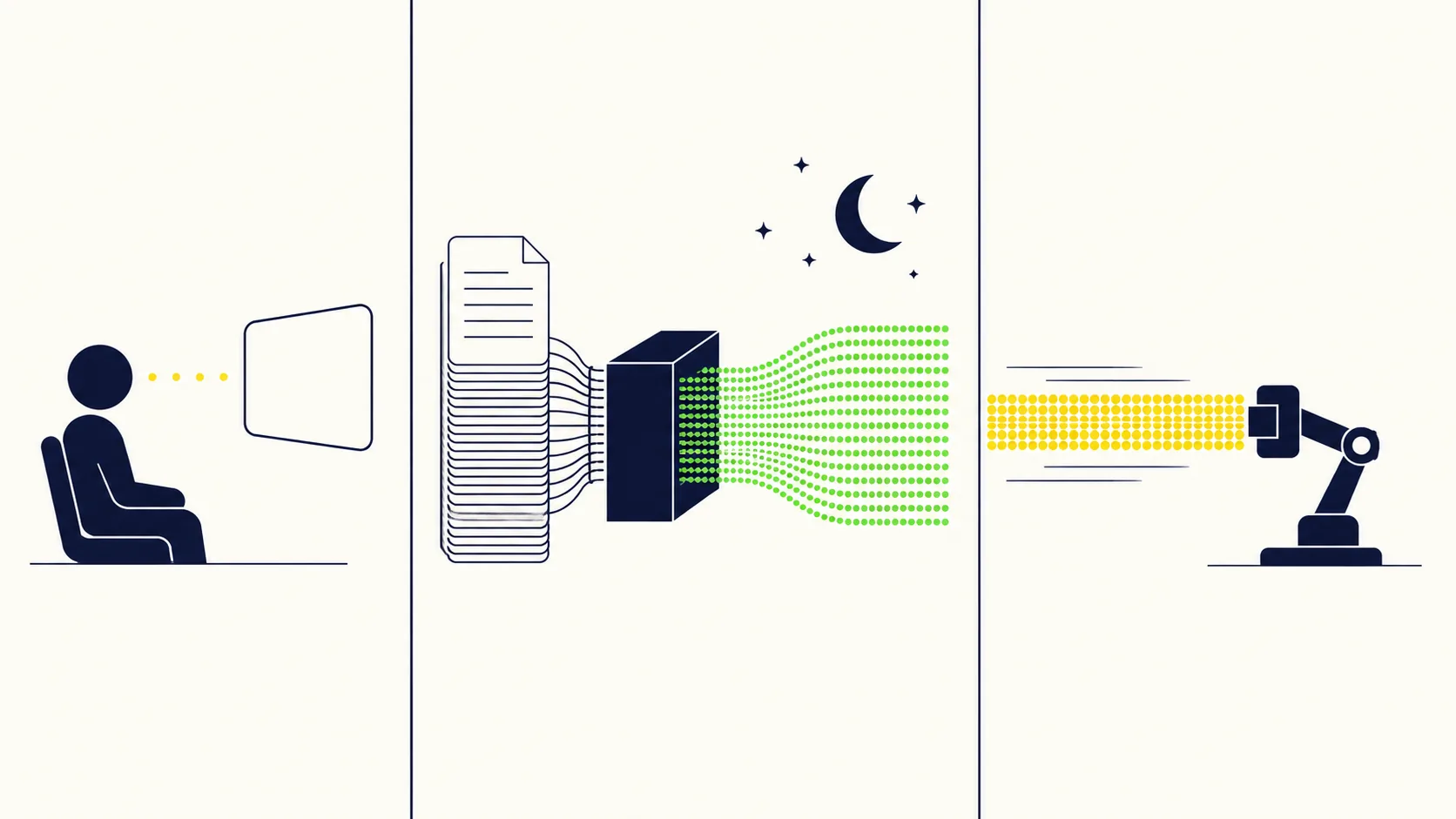
Use case 1: UI-based agent (chat, like Claude or ChatGPT)
Staff open a browser tab and ask questions. A human reads every word.
| Dimension | Requirement |
|---|---|
| Speed that matters | Per-user t/s, and TTFT above all |
| Minimum viable | 15 t/s per active user, TTFT under 2 s |
| Comfortable target | 25–40 t/s per active user |
| Sizing driver | Concurrent users, not total users |
| Typical concurrency | 5–10% of headcount at any moment |
The critical insight executives miss: 200 staff does not mean 200 simultaneous requests. People read, think and type between messages. Real-world concurrency for internal chat is typically 5–10% of the licensed population, so 200 staff means planning for roughly 10–20 requests in flight. That is a far smaller machine than the headcount suggests.
This is also the easiest workload to serve well. It is bursty, forgiving, and a mid-size model is genuinely good enough for the vast majority of questions.
Use case 2: Daily processing via API
Overnight document extraction, ticket classification, transcript summarisation, enrichment pipelines. No human is watching.
| Dimension | Requirement |
|---|---|
| Speed that matters | Total tokens/day, not per-stream t/s |
| Per-stream t/s | Almost irrelevant: 5 t/s is fine if you run 100 at once |
| TTFT | Irrelevant |
| Sizing driver | Documents/day × tokens/document |
| Key lever | Batching: this is where hardware shines |
Batching changes the economics completely. The same DGX Spark that manages a slow 34.1 t/s for one user on Llama 3.1 8B delivers 924 t/s in aggregate at 128 concurrent requests, a 27× multiplier from doing nothing but running jobs in parallel. Hardware that looks disappointing on a single-user demo can be outstanding for batch work.
Do the arithmetic in tokens per day. A modest 1,000 t/s aggregate, run overnight for eight hours, is 28.8 million tokens, comfortably tens of thousands of documents. Run it around the clock and it is 86 million.
Use case 3: Coding agent
The most demanding case by a wide margin, and the one most often under-specified.
| Dimension | Requirement |
|---|---|
| Speed that matters | Single-stream t/s and prefill speed |
| Minimum viable | ~30 t/s: below this developers stop using it |
| Comfortable target | 50–80 t/s |
| Output per task | 10,000–100,000+ tokens |
| Context per step | Very large and resent repeatedly |
Nobody reads a coding agent's output, so the 5 t/s human benchmark is irrelevant. What matters is wall-clock time to finish a task. An agent emitting 30,000 tokens takes 16.7 minutes at 30 t/s and 5 minutes at 100 t/s, and a developer will abandon the 16-minute version. The economics of the whole deployment turn on whether engineers actually use it.
There is a hidden second cost too: agents re-read large amounts of code on every step, so the model spends heavily on reading context, not just writing. That is prefill work, and it scales with context length. Long-context capability matters here; see our write-up of a 500K-token deployment on four DGX Sparks for what that looks like at the limit.
| Workload | Min t/s | Target t/s | Primary metric | TTFT matters? | Batching helps? |
|---|---|---|---|---|---|
| UI chat agent | 15 | 25–40 | Per-user speed | Critically | Somewhat |
| Daily API processing | 5 | Any | Tokens/day total | No | Enormously |
| Coding agent | 30 | 50–80 | Task completion time | Yes | Barely |
Part 4. The physics: why bandwidth, not teraflops, decides your speed
Here is the single most useful thing an executive can understand about AI hardware, and it takes one sentence.
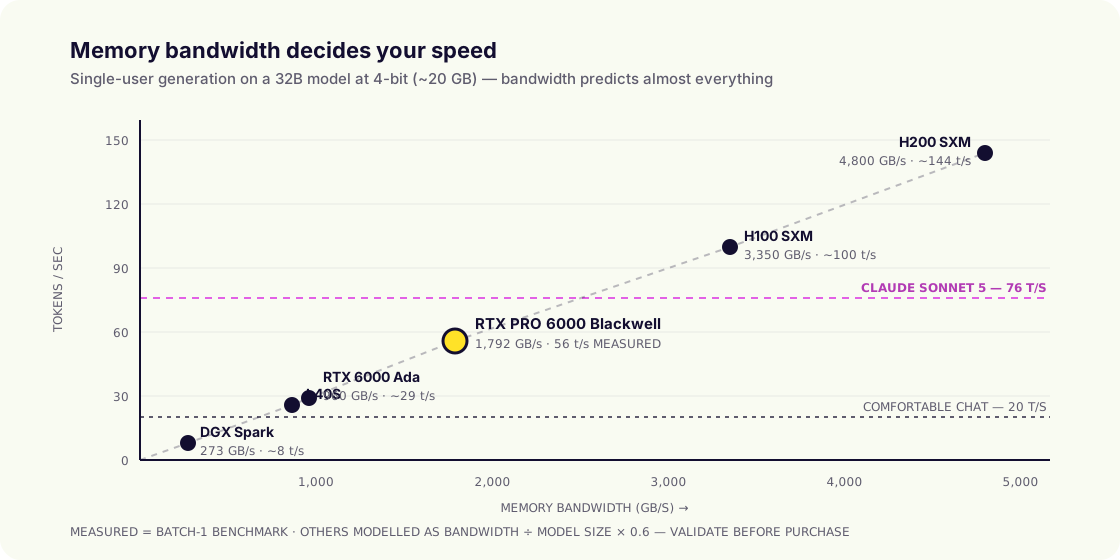
To produce each token, the GPU must read the entire model out of its memory. So generation speed is set by memory bandwidth, not by raw compute.
That gives you a formula you can apply on a napkin:
tokens/sec ≈ (memory bandwidth in GB/s ÷ model size in GB) × 0.6
The 0.6 is a real-world efficiency factor. It reconciles closely with measured results across the GPUs below, so it is good enough for procurement decisions, though you should always validate with your own benchmark before signing.
Worked example, a 32-billion-parameter model at 4-bit quantisation, about 20 GB in memory:
| GPU | Bandwidth | Predicted | Measured |
|---|---|---|---|
| DGX Spark (GB10) | 273 GB/s | 8 t/s | n/a |
| RTX PRO 6000 Blackwell | 1,792 GB/s | 54 t/s | 56 t/s ✓ |
| H100 SXM | 3,350 GB/s | 100 t/s | n/a |
Two consequences follow immediately, and both save money.
Consequence one: a smaller model is faster on the same hardware. Halve the model, double the speed. Most of the "our AI is too slow" complaints are a model-size choice, not a hardware failure.
Consequence two: mixture-of-experts models break the rule in your favour. An MoE model only activates a fraction of itself per token, so it reads far less memory. On an RTX PRO 6000, an 80-billion-parameter MoE model runs at 124 t/s while a 32-billion dense model manages 56 t/s: the model more than twice the size runs more than twice as fast. If speed matters, model architecture is as important as the GPU.
Part 5. The GPU matrix: memory, bandwidth, power, price
This is the table to bring to your budget meeting. Prices are indicative street ranges for hardware alone and move constantly; treat them as ratios rather than quotes.
| GPU | Memory | Bandwidth | Power | Indicative price | Largest model (4-bit) |
|---|---|---|---|---|---|
| DGX Spark (GB10) | 128 GB unified | 273 GB/s | 240 W* | ~$4,000 | ~110B dense / 120B MoE |
| RTX 6000 Ada | 48 GB GDDR6 | 960 GB/s | 300 W | ~$7,000 | ~24B |
| L40S | 48 GB GDDR6 | 864 GB/s | 350 W | ~$8,000 | ~24B |
| RTX PRO 6000 Blackwell | 96 GB GDDR7 | 1,792 GB/s | 600 W | $7,900–10,900 | ~50B dense |
| RTX PRO 6000 Max-Q | 96 GB GDDR7 | 1,792 GB/s | 300 W | ~$8,500–11,500 | ~50B dense |
| H100 SXM | 80 GB HBM3 | 3,350 GB/s | 700 W | $25,000–38,000 | ~40B |
| H200 SXM | 141 GB HBM3e | 4,800 GB/s | 700 W | $30,000+ | ~70B |
* DGX Spark's 240 W is whole-system power, not just the GPU. The fairest comparison on that row is against a complete workstation, not a bare card.
Measured single-user speeds on the RTX PRO 6000 Blackwell
These are real batch-size-1 measurements, not projections. Note how model architecture matters more than parameter count:
| Model | Size on disk | Speed | Suitable for |
|---|---|---|---|
| Mistral Nemo 12B (Q4) | 6.6 GB | 158 t/s | Everything, very fast |
| Qwen2.5-Coder 14B (Q4) | 8.4 GB | 117 t/s | Coding agents |
| Qwen3-Next 80B MoE (Q4) | 46.9 GB | 124 t/s | Coding agents, chat (best of both) |
| Qwen2.5 32B (Q4) | 18.5 GB | 56 t/s | Coding agents, chat |
| Mixtral 8×22B (Q4) | 74.1 GB | 54 t/s | Chat, batch |
| Llama 3.1 70B (Q4) | 39.6 GB | 27 t/s | Chat, batch (too slow for agents) |
| Qwen2.5 72B (Q4) | 44.2 GB | 25 t/s | Chat, batch |
Read that Qwen3-Next row again. An 80-billion-parameter model at 124 t/s, faster than Claude Sonnet 5's measured 76.1 t/s, on a single GPU that costs less than a mid-range company car. That is the state of play in 2026, and it is why this conversation has changed.
Measured speeds on the DGX Spark, and the batching effect
| Model | 1 user | Batched | Multiplier |
|---|---|---|---|
| Llama 3.1 8B (FP4) | 34.1 t/s | 924 t/s @128 | 27× |
| GPT-OSS 20B (NVFP4) | 39.7 t/s | 612 t/s @128 | 15× |
| Qwen3 Coder 30B MoE (FP8) | 46.5 t/s | 483 t/s @64 | 10× |
| GPT-OSS 120B (NVFP4) | 31.4 t/s | 163 t/s @64 | 5× |
| Mistral Small 24B (BF16) | 5.3 t/s | 159 t/s @128 | 30× |
The Mistral Small row is the lesson in miniature: 5.3 t/s is unusable for a person and perfectly good for a batch pipeline. Same box, same model, opposite verdicts, determined entirely by workload, not hardware.
Part 6. Power: the cost nobody puts in the business case
GPUs are rated in watts, and watts become three separate line items: electricity, cooling, and electrical work. The third one is the surprise.
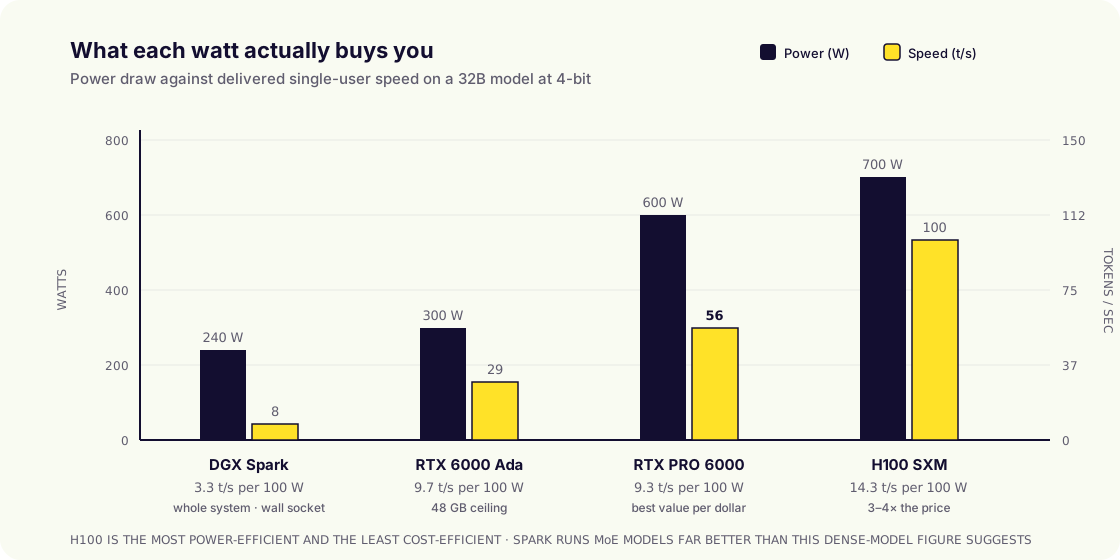
| Configuration | Load draw | kWh/year (24/7) | Electricity/yr* | Electrical requirement |
|---|---|---|---|---|
| 1 × DGX Spark | 240 W | 2,100 | ~$440 | Standard wall socket |
| 1 × RTX PRO 6000 workstation | ~900 W | 7,900 | ~$1,650 | Standard socket, good ventilation |
| 4 × DGX Spark cluster | ~1,000 W | 8,800 | ~$1,850 | Standard sockets + network switch |
| 4 × RTX PRO 6000 server | ~3,200 W | 28,000 | ~$5,900 | Dedicated circuit, server room |
| 8 × RTX PRO 6000 server | ~6,000 W | 52,600 | ~$11,000 | 3-phase, ~2 tons cooling |
| 8 × H100 (DGX-class) | ~10,200 W | 89,400 | ~$18,800 | Datacentre-grade, liquid or high-flow air |
* At $0.15/kWh including a 1.4 PUE factor for cooling overhead. Scale to your local tariff; this ranges from ~$0.05 to ~$0.35/kWh worldwide.
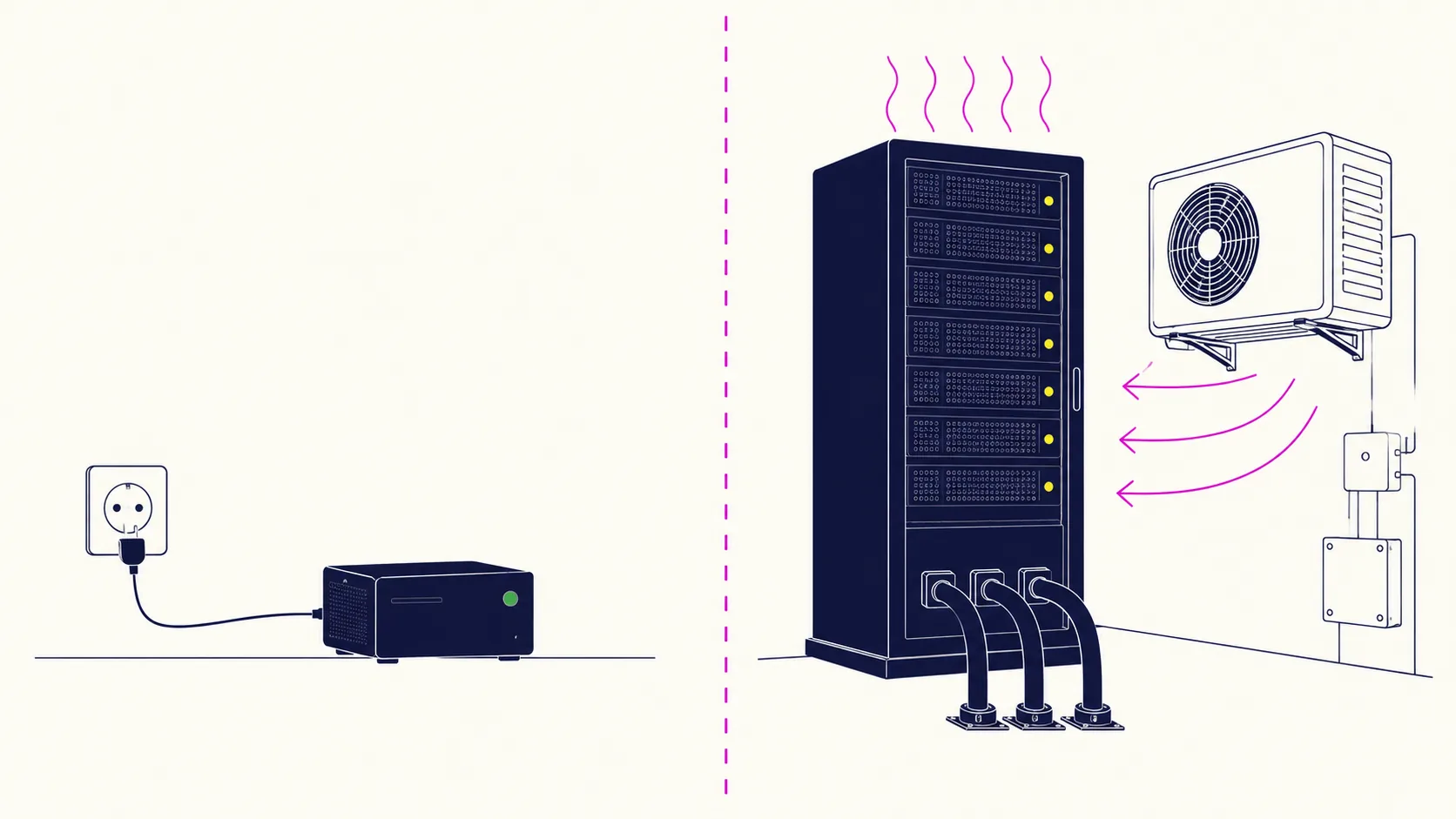
Three things to plan for that will not appear on the hardware quote:
- Heat is not optional. 6 kW of GPUs is 6 kW of heat, roughly 20,500 BTU/hr: about two tons of air conditioning, running whenever the cluster is busy. An unprepared server room hits thermal throttling within an hour and your benchmark numbers quietly evaporate.
- Circuits, not sockets. Above about 3 kW you are into dedicated circuits, and above about 5 kW usually three-phase. That is an electrician and a permit, with a lead time measured in weeks.
- Noise and placement. Server-form GPUs are loud enough to be intolerable in an office. They belong in a comms room, which needs to be on the cooling plan.
The good news: at the smaller tiers none of this applies. A DGX Spark plugs into a wall socket and is silent. That gap, between "plug it in" and "call an electrician", is the real dividing line in this market, and it sits between tiers 1 and 2 below.
Part 7. Solution tiers: what to actually buy
| Tier | Configuration | Hardware | Power | Concurrent users | Best for |
|---|---|---|---|---|---|
| 0. Evaluate | 1 × DGX Spark | ~$4,000 | 240 W | 1–2 | Proving the concept before you commit |
| 1. Team | 1 × RTX PRO 6000 workstation | $12–18k | ~900 W | 5–15 | A department's chat + light coding |
| 2. Department | 2–4 × RTX PRO 6000 server | $45–70k | 1.6–3.2 kW | 20–75 | The sweet spot for most mid-size firms |
| 3. Organisation | 8 × RTX PRO 6000 | $120–180k | ~6 kW | 100–300 | Company-wide rollout, agents at scale |
| 4. Frontier | 8 × H100/H200 or multi-node | $250–400k+ | ~10 kW | 300+ | Largest open models, research, extreme context |
Tier 0: a single DGX Spark (~$4,000)
Understand what this is: a development and evaluation machine, not a production cluster. Its 273 GB/s bandwidth means a 70B dense model crawls. But its 128 GB of unified memory lets you load models that a $10,000 GPU cannot hold, and MoE models run genuinely well on it: 46.5 t/s on a 30B coder MoE is a real working speed.
The honest recommendation: buy one before you buy anything bigger. Four thousand dollars to validate your actual workloads against real models, on real hardware, is the cheapest risk reduction available in this category. Interestingly, DGX Sparks also cluster: the four-node GLM-5.2 deployment we analysed runs half-million-token contexts on ~1 kW total.
Tier 1: one RTX PRO 6000 workstation ($12–18k all-in)
The best value in the market right now, and where most first real purchases should land. 96 GB of memory at 1,792 GB/s runs a 32B model at 56 t/s or an 80B MoE at 124 t/s, frontier-comparable speed, while plugging into an ordinary wall socket. Comfortably serves a department's chat and a handful of coding agents.
Tier 2: 2–4 RTX PRO 6000 in a server ($45–70k)
The sweet spot for most mid-size organisations. Four cards give 384 GB of pooled memory, enough for the largest practical open models with room for long contexts and dozens of concurrent users. For reference, a single RTX PRO 6000 was measured at 8,990 tokens/sec on Llama-8B under 300 concurrent requests, outperforming an H100 at a third of the price. This is the tier where a dedicated circuit and a proper comms room become non-negotiable.
Tier 3 and 4: 8 GPUs and beyond ($120k+)
Now you are running an organisation-wide service, and the constraint shifts from silicon to operations: monitoring, capacity planning, model updates, an on-call rota. Do not enter this tier without either an internal platform team or a managed arrangement. The hardware is the easy part.
Part 8. When to buy, and when not to
| ✓ Buy when | ✗ Don't buy when |
|---|---|
| Cloud AI spend is consistently above ~$5–8k/month | Usage is occasional, spiky or exploratory |
| Data legally cannot leave your premises | Nothing you process is sensitive |
| Usage is sustained and predictable | You need absolute frontier reasoning on every task |
| You need fixed, forecastable cost | Fewer than ~10 users, light chat only |
| Rate limits or model deprecation have burned you | You have no ops capacity and won't buy managed |
| You want unlimited internal experimentation | Your requirements will change completely in 6 months |
The financial test is straightforward. Take your monthly cloud AI invoice, multiply by 24, and compare it to the fully-loaded hardware cost including power, cooling and operations. At sustained enterprise usage the crossover typically lands between 12 and 24 months against a 5-year hardware life. Below roughly $5,000 a month, the cloud is genuinely the cheaper answer and you should say so out loud.
But run the test twice: once on cost, once on control. Plenty of organisations buy at $2,000/month of usage because the compliance position is worth more than the arithmetic, and that is a perfectly rational decision as long as it is made deliberately.
Part 9. What to actually expect
Setting expectations properly is the difference between a successful deployment and an expensive shelf ornament.
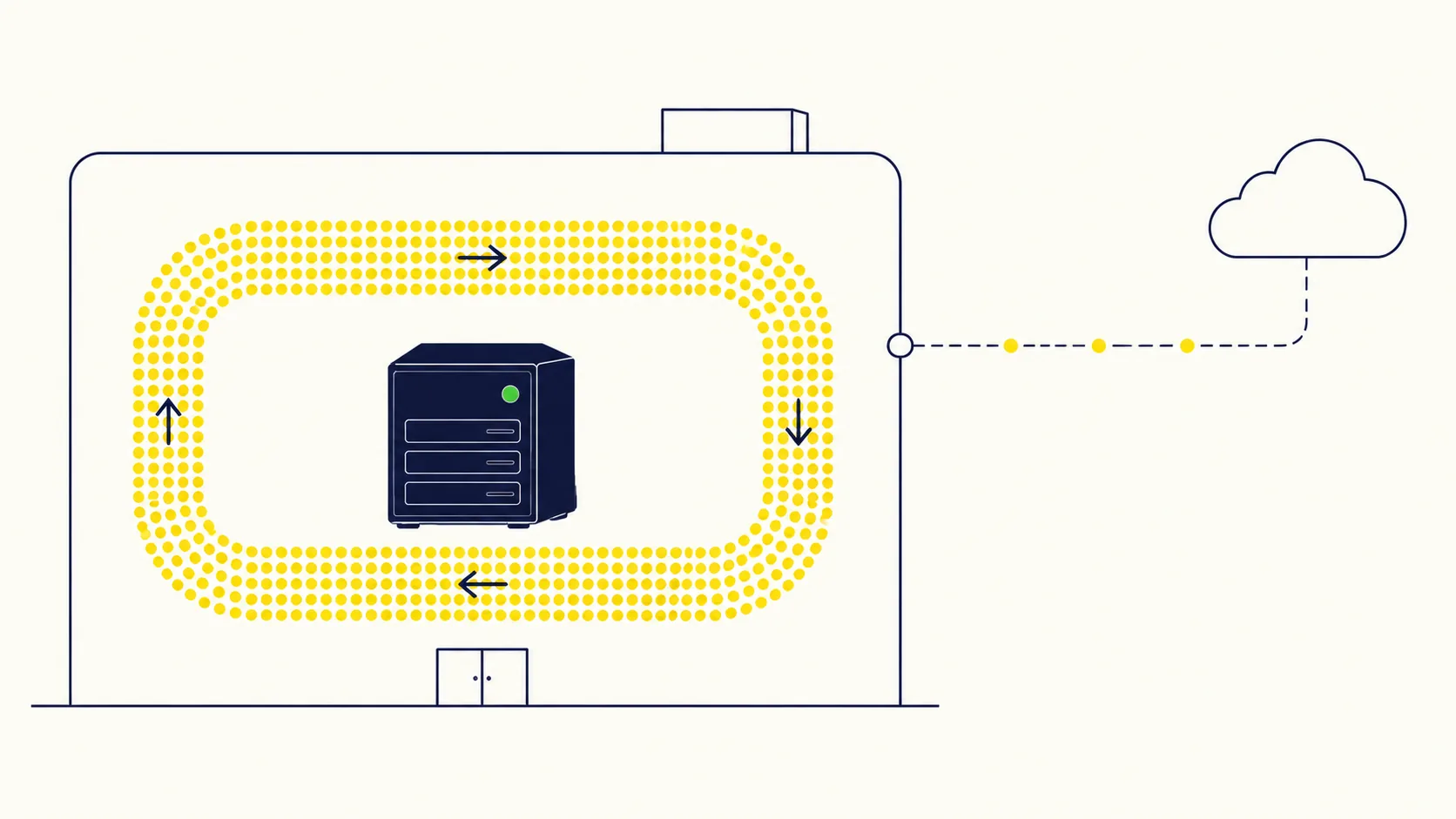
Expect it to feel fast. A well-configured tier-1 or tier-2 system, running an appropriately sized model, will feel comparable to, and sometimes faster than, a cloud chat product, largely because you skip the internet round-trip and the reasoning delay.
Expect a capability gap on the hardest tasks. On genuinely difficult reasoning, novel problems and the most complex agentic work, frontier closed models are still ahead. Plan a hybrid: local by default, cloud by exception for non-sensitive hard problems.
Expect to spend real time on model selection. The difference between the right and wrong open model for your workload is larger than the difference between two GPU tiers, and (as the MoE numbers show) often free.
Expect operational work. Updates, monitoring, capacity management, the occasional 2 a.m. incident. Budget for it internally or buy it as a service; do not pretend it is zero.
Expect the value to come from usage you did not forecast. Once inference is a fixed cost rather than a metered one, teams stop rationing it. That behavioural shift (people trying things because it is free at the margin) is consistently where the return actually materialises.
Frequently asked questions
- What is a good tokens-per-second speed?
- For a person reading a chat response, ~5 t/s matches average adult reading speed and 15–20 t/s feels comfortable; above ~30 t/s no human can keep up. Coding agents want 50 t/s or more because no human reads the output. Batch API work does not care about per-stream speed at all, only total daily throughput.
- How fast are Claude and ChatGPT really?
- Independently measured in mid-2026: Claude Opus 5 at max reasoning effort ~52.6 t/s, Claude Sonnet 5 ~76.1 t/s, Claude Haiku 4.5 ~114 t/s, with small speed-optimised models like Gemini 3.5 Flash-Lite around 417 t/s. Crucially, for reasoning models the wait before the first token (up to 201 seconds in one measurement) usually dominates the experience far more than the streaming rate.
- Can on-premise hardware match those speeds?
- On raw speed, yes. A single RTX PRO 6000 Blackwell was measured at 124 t/s on an 80B mixture-of-experts model and 56 t/s on a 32B dense model, both in or above the frontier reasoning-model band. On raw capability for the hardest tasks, no; frontier closed models still lead.
- How much power does an AI cluster need?
- One DGX Spark draws 240 W from a normal socket. A single-GPU workstation is around 900 W. A 4-GPU server is ~3.2 kW and needs a dedicated circuit. An 8-GPU server is ~6 kW and needs three-phase power plus roughly two tons of cooling. The jump from "plug it in" to "call an electrician" happens between one and four GPUs.
- Should we start small or buy for our projected peak?
- Start small, almost always. Buy a $4,000 evaluation box, run your real workloads on it for a month, and let the measurements size the real purchase. The most expensive mistake in this category is buying a tier-3 cluster for a tier-1 workload, and the second most expensive is buying for a headcount number when only 5–10% of that headcount is ever concurrent.
Sources & method
Model output speeds are from Artificial Analysis (July 2026). Reading speed is from the Brysbaert meta-analysis of 190 studies. GPU specifications are from NVIDIA product pages. Single-user RTX PRO 6000 figures are batch-1 llama.cpp measurements; DGX Spark figures are vLLM measurements from StorageReview; concurrency figures are from published vLLM benchmark suites. Predicted figures are marked as such and derived from the bandwidth formula in Part 4; validate against your own workload before purchasing.