 thelocalbuild
Guide
On-premise AI server: the enterprise guide
Everything you need to run large language models privately, on hardware you control, with zero data leaving your network.
Cloud AI is convenient, but for many organisations it is a non-starter: sending contracts, patient records, source code or customer data to a third-party API is a compliance, security and IP risk they cannot take. An on-premise AI server solves this by running the same class of models locally. This guide explains what that means, how it works, and what it takes to deploy one.
What is an on-premise AI server?
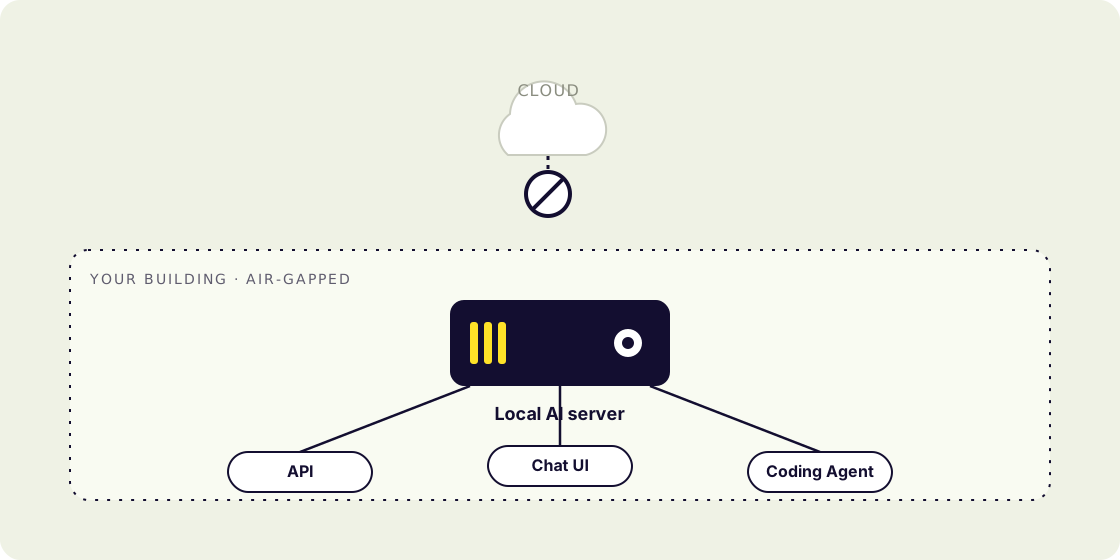
An on-premise AI server is a machine, usually GPU-accelerated, that hosts and serves AI models inside your own environment. When a user or application sends a prompt, it is processed on that server and the response comes back without any request ever leaving your network. There is no third-party cloud, no external API, and no telemetry.
In practice a complete platform bundles four things: the hardware, the models (preinstalled and kept current), an OpenAI-compatible API for developers, and a chat interface for staff. Optionally, it is fully air-gapped, it works with the network cable unplugged.
Why run AI on-premise?
- Data residency & compliance. Sensitive data never leaves your jurisdiction, which is often the only way to satisfy GDPR/DSGVO, HIPAA and internal data-governance rules.
- No third-party exposure. Your prompts, documents and outputs are never used to train someone else's model or stored on infrastructure you do not control.
- Predictable cost. A one-time hardware investment replaces unpredictable per-token cloud bills, which matters a lot at scale.
- Lower latency. Inference happens on your LAN, not across the internet.
- Sovereignty. You own the weights and the stack; nothing can be deprecated or price-changed out from under you.
What hardware does it need?
The right server depends on the model sizes and how many people use it at once. Token-generation speed is bound by GPU memory bandwidth, so both capacity (which models fit) and bandwidth (how fast they run) matter.
| Tier | Hardware | Users |
|---|---|---|
| Starter | 1× datacentre GPU, ~96 GB | 1–10 |
| Business | 4× GPU, ~384 GB | 10–50 |
| Enterprise | 8× GPU, ~768 GB | 50+ |
| Datacenter | Multi-GPU cluster, 1.4 TB+ | 150+ |
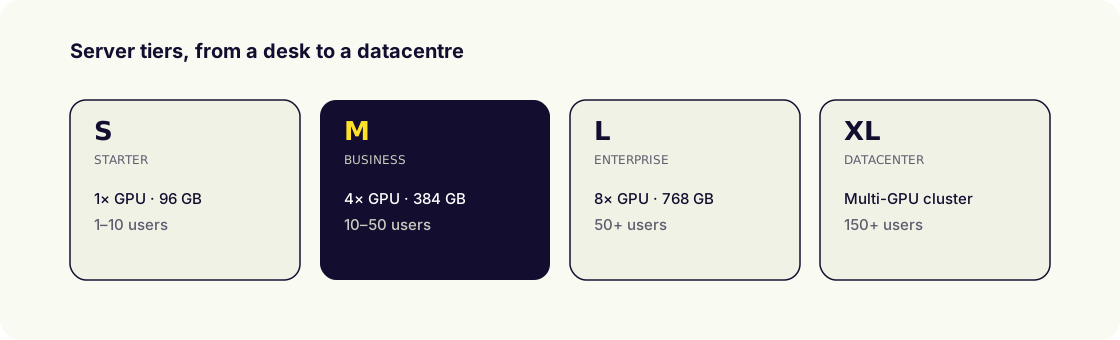
You do not need to run every model at once, you choose the ones that fit your use cases and size the box accordingly. Our configurator sizes a server from the models you pick.
Which models can you run?
On-premise deployments use open-weight models you can download and self-host. That now includes frontier-class options: Llama (Meta), Qwen (Alibaba), DeepSeek, Kimi (Moonshot), Mistral, Gemma (Google), GLM and more. See our deep-dive on running open-source LLMs on-premise.
How do teams actually use it?
- Knowledge retrieval (RAG) over internal documents, with citations.
- An OpenAI-compatible API to embed private AI in existing apps.
- Fine-tuning models on proprietary data for a durable edge.
- Coding assistants and agents that run entirely behind the firewall.
On-premise vs cloud
The trade-off is control and long-term cost (on-prem) versus zero setup and instant elasticity (cloud). For regulated industries and anyone handling sensitive IP, on-prem usually wins. We break down the numbers in on-premise vs cloud AI.
How long does deployment take?
Less than most people expect. Because the hardware, models, API and UI ship as one preconfigured platform, a typical deployment is measured in hours to days, not months. The steps are: rack and power the server, connect it to your network (or run it fully air-gapped), integrate authentication (SSO), and choose which models to load. Ongoing updates (new models, security patches) are delivered without you rebuilding anything.
Who is on-premise AI for?
Any organisation where data sensitivity, regulation or IP protection outweighs the convenience of a cloud API. In practice, the strongest fits are:
- Financial services (lending, underwriting, KYC/AML) with strict data-governance rules.
- Healthcare, patient records under HIPAA and equivalent regimes.
- Legal & professional services, privileged documents and client confidentiality.
- Government & defence, sovereignty and air-gapped requirements.
- Engineering & R&D, protecting source code and proprietary research.
Should you buy or build?
You can assemble an on-premise stack yourself: buy GPUs, set up an inference engine, wire an API gateway, build a UI, and staff a team to keep it running. It is entirely possible, but it is also a serious, ongoing engineering commitment. A managed platform trades that for a turnkey system: preinstalled models, ready API and UI, and operations handled for you, so you get the benefits of on-prem without hiring an AI-infrastructure team. The right choice depends on whether running AI infrastructure is a core competency you want to own.
Frequently asked questions
- What is an on-premise AI server?
- Hardware that runs LLMs and other AI on your own premises, so requests are processed locally and no data goes to a third-party cloud.
- How much does it cost?
- Entry single-GPU servers start in the low thousands; multi-GPU business and enterprise nodes range from roughly ten to over a hundred thousand, depending on models and concurrent users.
- Is it hard to maintain?
- It doesn't have to be. A managed platform handles installation, updates and operations, often with self-healing agents, so you don't need to hire an AI infrastructure team.