 thelocalbuild
How-to
How to run open-source LLMs on-premise
Choosing models, sizing GPU memory, picking an inference engine, and serving a private OpenAI-compatible API, on hardware you control.
The open-weight model ecosystem has caught up to the frontier. You can now self-host models that rival closed APIs, privately, with no external calls. Here's how the pieces fit together.
1. Choose your models
Open-weight families you can download and run include Llama (Meta), Qwen (Alibaba), DeepSeek, Kimi (Moonshot), Mistral, Gemma (Google) and GLM. Pick by task, not hype:
| Need | Good picks |
|---|---|
| General chat & agents | Qwen3 32B, Llama 3.3 70B, GLM-4.6 |
| Frontier quality | DeepSeek-V3, Kimi K2 (large MoE, multi-GPU) |
| Fast / high-volume | Qwen3 8B, Ministral 8B, Gemma 3 12B |
| Coding | Qwen2.5-Coder, DeepSeek-R1 |
| Vision & OCR | Qwen2.5-VL, Llama 3.2 Vision |
You don't run them all at once, you pick what your use cases need. Our configurator lists 50+ models and sizes the hardware for whatever you select.
2. Size the GPU memory
The single most important constraint is VRAM. With 4-bit quantisation (the usual choice for on-prem serving), a rough budget is a little over half a gigabyte per billion parameters, plus overhead for the context window:
- An 8B model → ~5 GB (runs on a single consumer GPU)
- A 32B model → ~20 GB
- A 70B model → ~40 GB
- Frontier MoE models (200B–1T) → hundreds of GB, across multiple GPUs
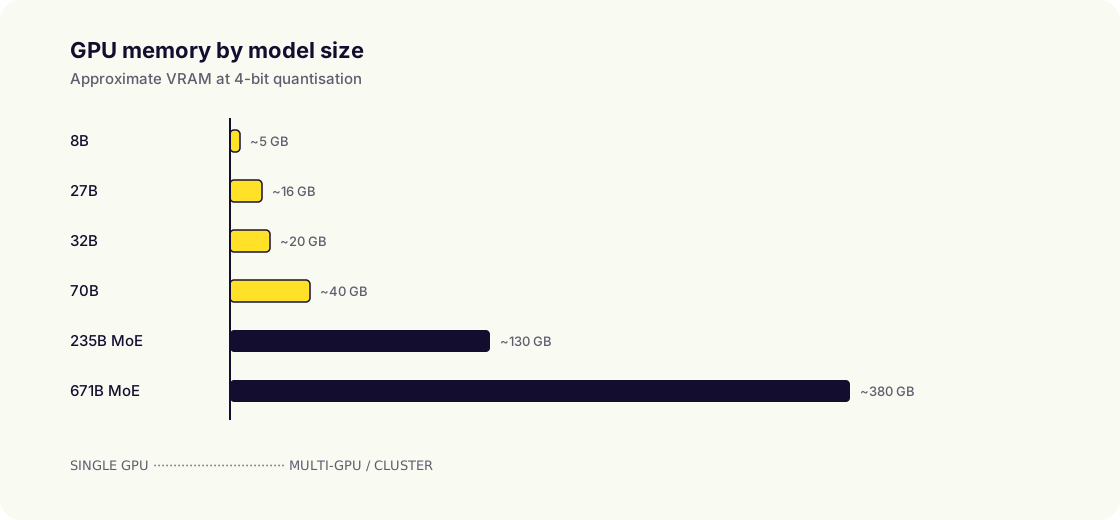
Note that memory bandwidth, not just capacity, sets your tokens-per-second. A high-bandwidth datacentre GPU will generate far faster than a low-bandwidth unified-memory device of the same capacity.
3. Pick an inference engine
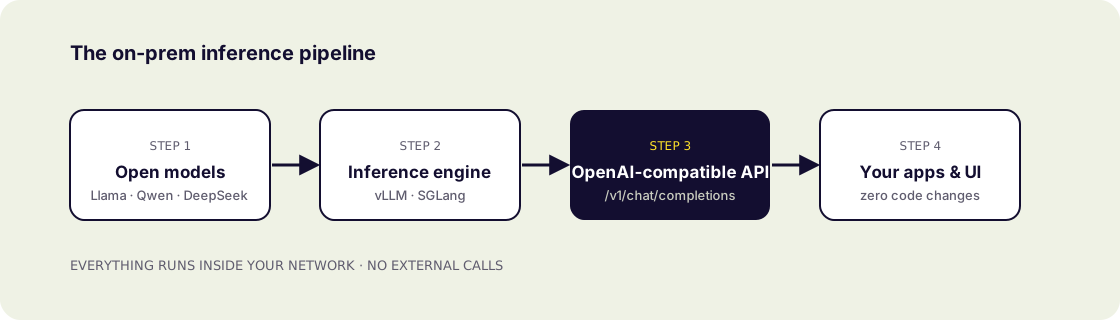
The inference engine turns model weights into a fast, concurrent server. The common production choices are vLLM, SGLang, TensorRT-LLM and llama.cpp. vLLM and SGLang give high throughput with continuous batching for many concurrent users; llama.cpp is great for smaller/edge setups.
4. Serve an OpenAI-compatible API
The practical win of self-hosting is that modern engines expose an OpenAI-compatible REST API. That means you can point existing apps and SDKs at your own endpoint (base_url="https://ai.yourco.local/v1") with essentially zero code changes, while every request stays on your network.
5. Add a UI and keep it running
Developers get the API; everyone else needs a chat interface. Round it out with role-based access, usage metrics and a plan for updates (new models ship constantly). This operational layer (installation, updates, monitoring, incident response) is where a managed platform saves you from hiring a dedicated AI-infra team.
The shortcut
Assembling all of this yourself is doable but non-trivial. A turnkey on-premise platform arrives with the models preinstalled, the API and UI ready, and operations handled; see the on-premise AI server guide for the full picture, or weigh it against the cloud in on-premise vs cloud AI.
Quantisation, explained
Models are trained at 16-bit precision, but for on-prem serving they are usually quantised to 8-bit or 4-bit: each weight is stored more compactly. This roughly halves or quarters the memory a model needs, letting far larger models fit on the same hardware, with only a small quality trade-off for well-tuned 4-bit formats. It is the single biggest lever for running big models on modest boxes, which is why the VRAM estimates above assume 4-bit.
Concurrency and throughput
Single-user speed (tokens per second) is one thing; serving a whole team at once is another. Modern engines use continuous batching to process many requests in parallel on the same GPU, so aggregate throughput scales well. When sizing, plan for peak concurrent users, not just the model; a bigger or higher-bandwidth GPU serves more people before latency climbs.
Keeping models updated
The open-model landscape moves fast, new releases land almost weekly. A good on-prem setup treats models as versioned, swappable artifacts: you can add a new model, A/B test it against your current one, and roll back if needed, without disrupting the running service. Managed platforms handle this for you, delivering tested, optimised model updates so your stack stays current without manual work.
Frequently asked questions
- Which open-source LLM is best to run on-premise?
- It depends on task and hardware. A mid-size model like Qwen3 32B or Llama 3.3 70B is a strong general default; frontier MoE models need multi-GPU servers; 8B-class models are fast on modest hardware.
- How much GPU memory do I need?
- With 4-bit quantisation, budget a little over half a gigabyte per billion parameters plus context overhead: roughly 20 GB for a 32B model, ~40 GB for 70B.
- Can I use my existing OpenAI code?
- Yes. Modern inference engines expose an OpenAI-compatible API, so you just change the base URL and keep your existing SDK and code.